Streaming#
In this page the approaches ot iterate over different phases of the graph execution are considered.
from typing import TypedDict, Literal, Annotated

import langgraph
from langgraph.graph import StateGraph, START, END
State streaming#
You can stream the state of the graph by using the stream method and it’s async version ,astreame, instead of the invoke method. This will return an interator that will return either the current state of the graph or it’s updates, depending on the stream mode:
The
stream_mode="updates"(default) returns only updates of the graph.The
stream_mode="values"returns entire state at each step.
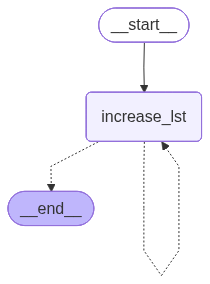
Consider an example in which a graph adds random values to a list until it reaches a specified length.
import random
import operator


class State(TypedDict):
    lst: Annotated[list[str], operator.add]


def increase_lst(
    state: State
) -> langgraph.types.Command[Literal["increase_lst", END]]:
    if len(state["lst"]) < 3:
        return langgraph.types.Command(
            update={"lst": [random.choice([
                "hello", "world", "this", "is", "me"
            ])]},
            goto="increase_lst"
        )
    return langgraph.types.Command(goto=END)


graph = (
    StateGraph(State)
    .add_node("increase_lst", increase_lst)
    .add_edge(START, "increase_lst")
    .compile()
)

graph
Invoking of the graph works just as expected: the output contains a list with the specified number of elements.
graph.invoke(State(lst=[]))
{'lst': ['me', 'me', 'world']}
If the stream method is invoked, an iterator is created:
next(iter(graph.stream(State(lst=[]))))
{'increase_lst': {'lst': ['is']}}
The following cell iterates through all the outputs of the graph:
for s in graph.stream(State(lst=[])):
    print(s["increase_lst"])
{'lst': ['world']}
{'lst': ['this']}
{'lst': ['me']}
None
Next code shows the stream_mode="values" case:
for s in graph.stream(State(lst=[]), stream_mode="values"):
    print(s)
{'lst': []}
{'lst': ['hello']}
{'lst': ['hello', 'hello']}
{'lst': ['hello', 'hello', 'world']}
We get all the corresponding states at each step.
Events streaming#
Using the grpaph’s astream_events method, you can execute graph events as langgraph accesses them.
The following cell creates a simple graph and shows some attributes of the events returned from the corresponding iterator.
class State(TypedDict):
    pass


def node(state: State):
    pass


graph = (
    StateGraph(State)
    .add_node("node", node)
    .add_edge(START, "node")
    .add_edge("node", END)
    .compile()
)

async for event in graph.astream_events(State()):
    print(event["event"], event["name"])
on_chain_start LangGraph
on_chain_start node
on_chain_stream node
on_chain_end node
on_chain_stream LangGraph
on_chain_end LangGraph
Model stream#
One of the most useful events is on_chat_model_stream. This event type retains the tokens returned by the call to the model - each token represents a different Langgraph event.
The following cell creates a graph which only node invokes the model with the given message.
from langchain_ollama import ChatOllama


class State(TypedDict):
    question: str


model = ChatOllama(
    model="llama3.1"
)


def node(state: State):
    model.invoke(state["question"])


graph = (
    StateGraph(State)
    .add_node("node", node)
    .add_edge(START, "node")
    .add_edge("node", END)
    .compile()
)
The following cell iterates over on_chat_model_stream events, and shows the content of the messages.
input_state = State(question="What is the capital of France")
async for event in graph.astream_events(input_state):
    if event["event"] == "on_chat_model_stream":
        print(event["data"]["chunk"].content)
The
 capital
 of
 France
 is
 Paris
.