
Conditional edges#
Conditional edges allow you to select which node will be executed next, after the current one.
from typing import Literal, TypedDict

import langchain_core

import langgraph
from langgraph.types import Command
from langgraph.graph import StateGraph, START, END, MessagesState


class State(TypedDict):
    pass
Definition#
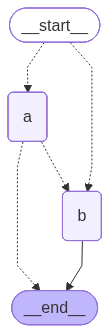
The are two main ways to define the conditional edges:
You can annotate node outputs as a
langgraph.types.Commandwith a literal that specifies the possible next nodes as a generic argument. Such a node must return alanggraph.types.Commandcontaining a state update and next node to be executed.The
add_conditional_edgesmethod of the builder, takes the method that must return the names of the possible subsequent nodes.
The following cell combines both definitions: node_a is referenced by the add_conditional_edges and itself selects either END or node_b.
def conditional_edge(state: State) -> Literal["a", "b"]:
    return state


def node_a(state: State) -> Command[Literal["b", "__end__"]]:
    return state


def node_b(state: State) -> State:
    return state


(
    StateGraph(State)
    .add_node("a", node_a)
    .add_node("b", node_b)

    .add_conditional_edges(START, conditional_edge)
    .add_edge("a", END)
    .compile()
)
Explicit syntax#
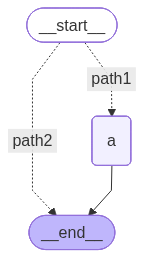
The most explicit syntax allows to define the arbitrary outputs for the decision node, regardless of where it will be applied. Using the path_map method of the StateGraph.add_conditional_edges, you can specify which outputs of the callable implementing the decision will invoke which the subsequent node.
The following cell defines the decision that annotated the return of either path1 or path2. When the conditional edge based on this function is defined in the graph, the subsequent nodes are mapped to the outputs of the decision in the path_map argument.
def decision(state: State) -> Literal["path1", "path2"]:
    return "path1"


def node_a(state: State):
    return {}


(
    StateGraph(State)
    .add_node("a", node_a)

    .add_conditional_edges(
        soruce=START,
        path=decision,
        path_map={
            "path1": "a",
            "path2": END
        }
    )
    .add_edge("a", END)
    .compile()
)
Goto several#
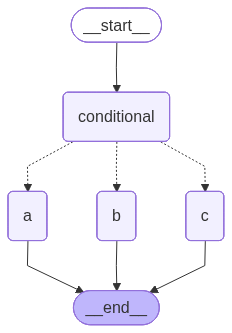
To execute several nodes after a given conditional node, return a list of values containing desired nodes.
The following cell defines a graph with a conditional node that can invoke three other nodes, but randomly invokes two of them.
from random import sample


def node_a(state: State) -> State:
    print("node a")
    return state


def node_b(state: State) -> State:
    print("node b")
    return state


def node_c(state: State) -> State:
    print("node c")
    return state


def conditional(state: State) -> Command[Literal["a", "b", "c"]]:
    return Command(goto=sample(["a", "b", "c"], k=2))


graph = (
    StateGraph(State)
    .add_node("conditional", conditional)

    .add_node("a", node_a)
    .add_node("b", node_b)
    .add_node("c", node_c)

    .add_edge("__start__", "conditional")
    .add_edge("a", "__end__")
    .add_edge("b", "__end__")
    .add_edge("c", "__end__")

    .compile()
)
graph
The following cell invokes the graph for a several times.
for i in range(3):
    print("=" * 80)
    graph.invoke({})
================================================================================
node a
node b
================================================================================
node a
node c
================================================================================
node a
node c
Send to node#
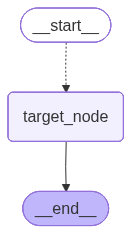
The conditional edge that returns langgraph.types.Send sends the specified data to the specified node.
Check official description in Send section of the official documentation.
The following cell defines route function that sends {"out": "to target node"} to the target_node.
from langgraph.types import Send


class OverallState(TypedDict):
    ans: str


def route(state: OverallState) -> Send:
    return Send("target_node", {"out": "to target node"})


def target_node(state: dict) -> OverallState:
    print("State for the target node", state)
    return OverallState(ans="This is from target node")


graph = (
    StateGraph(OverallState)
    .add_node("target_node", target_node)

    .add_conditional_edges(START, route, ["target_node"])
    .add_edge("target_node", END)

    .compile()
)
graph
The invocation of the graph shows
graph.invoke(OverallState(ans="input"))
State for the target node {'out': 'to target node'}
{'ans': 'This is from target node'}
Tools condition#
The langgraph.prebuilt.tools_condition function is designed for use in conditional edges that determine wheather to went to go to the tools node or to end the execution.
The following cell defines the conditional edge useing the langgraph.prebuilt.tools_condition as a decision function.
def tool_node(state: MessagesState):
    print("tool node is invoked")


def regular_node(state: MessagesState):
    print("reuglar node is invoked")


graph = (
    StateGraph(MessagesState)
    .add_node("tools", tool_node)
    .add_conditional_edges(
        START,
        langgraph.prebuilt.tools_condition,
    )
    .compile()
)
graph
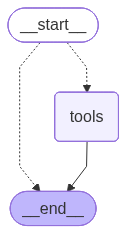
As a resutl, the __start__ node refers either to the tools node or to the __end__ node.
Consider how the output of this funciton depends on the input. The following cell passes the regular message without any tools calls to the langgraph.prebuilt.tools_condition.
langgraph.prebuilt.tools_condition(
    MessagesState(messages=[
        langchain_core.messages.AIMessage(content="Retular output.")
    ])
)
'__end__'
The result condition directs the flow to the __end__ of the graph.
The crucial case here is the case when the message contains the root call.
langgraph.prebuilt.tools_condition(
    MessagesState(messages=[
        langchain_core.messages.AIMessage(
            content="",
            tool_calls=[{
                "id": "call_1",
                "name": "search",
                "args": {"query": "LangGraph conditions"}
            }]
        )
    ])
)
'tools'
The function returns the tools node to be executed next.