
Composition#
Consider the options to build some specific kind of the graph.
from time import sleep
from typing import TypedDict

import langgraph
import langchain_core
import langgraph.prebuilt

from langgraph.graph import StateGraph, START, END

from langchain_ollama import ChatOllama
Parallel execution#
If a node has multiple outgoing edges, the flows defined by those edges will execute in parallel.
The following cell defines and displays this type of graph. The nodes of the graph display information about the start and end of exection, and block the flow for a while.
class State(TypedDict):
    pass


builder = StateGraph(State)


def node_a(state: State):
    print("executing a")
    sleep(10)
    print("finishing a")


def node_b(state: State):
    print("executing b")
    sleep(10)
    print("execution b")


builder.add_node("a", node_a)
builder.add_node("b", node_b)

builder.add_edge(START, "a")
builder.add_edge(START, "b")
graph = builder.compile()
graph
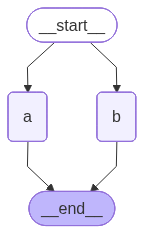
The project’s invocation is represented in the following cell:
graph.invoke(State())
executing a
executing b
finishing a
execution b
It follows from the result that flows was executed in parallel.
Tool node#
The langgraph.prebuilt.ToolNode is a special class automatically invokes a tool if the previous message contains a tool invocation.
The following cell creates a graph that uses the ToolNode right after the model invocation.
def kobak_transformation(inp: str) -> str:
    '''
    Provides the kobak transformation for `inp`.
    '''
    return inp[::-1]


model = ChatOllama(model="llama3.2:1b", temperature=0)
model_with_tools = model.bind_tools([kobak_transformation])


def tool_calling_llm(state: langgraph.graph.MessagesState):
    return {"messages": [model_with_tools.invoke(state["messages"])]}


graph = (
    langgraph.graph.StateGraph(langgraph.graph.MessagesState)

    .add_node("tool_calling_llm", tool_calling_llm)
    .add_node(
        "tools",
        langgraph.prebuilt.ToolNode([kobak_transformation])
    )

    .add_edge("__start__", "tool_calling_llm")
    .add_edge("tool_calling_llm", "tools")
    .add_edge("tools", "__end__")

    .compile()
)
The following cell triggers the graph to be executed use the tool call. You can then see the result.
ans = graph.invoke(
    {"messages": [
        langchain_core.messages.HumanMessage(
            "Perform kobak transformation for 'hello'"
        )
    ]}
)

for m in ans["messages"]:
    m.pretty_print()
================================ Human Message =================================

Perform kobak transformation for 'hello'
================================== Ai Message ==================================
Tool Calls:
  kobak_transformation (36d1ffe4-6bde-4e14-971d-8eb94e1483c7)
 Call ID: 36d1ffe4-6bde-4e14-971d-8eb94e1483c7
  Args:
    inp: hello
================================= Tool Message =================================
Name: kobak_transformation

olleh
Subgraph#
You can add additional graphs as regular nodes to your main graph.
The following cell defines a simple graph that we will use as as included graph. This graph simply prints a message to indicate that it has been invoked.
class State(TypedDict):
    pass


def subgraph_node(state: State):
    print("Subgraph invoked")


subgraph = (
    StateGraph(State)
    .add_node("a", subgraph_node)
    .add_edge(START, "a")
    .add_edge("a", END)
    .compile()
)
subgraph
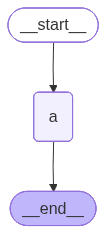
The following cell incorporates the subraph into the main graph and invokes the final graph.
def outher_node(state: State) -> State:
    print("Outer node invoked")


graph = (
    StateGraph(State)

    .add_node("node", outher_node)
    .add_node("subgraph", subgraph)

    .add_edge(START, "node")
    .add_edge("node", "subgraph")
    .add_edge("subgraph", END)

    .compile()
)
graph.invoke(State())
Outer node invoked
Subgraph invoked
As a result, both the messages specified by the subgraph and the outer graph are printed.
Note For some reason the langgraph fails to create a schema for graphs that include subgraphs.
Multiple schemas#
Although there is one schema for the state, but the nodes can communicate with each other using different shcemas. This does not constitute a state; it is simply information passed from one node to the next.
The following cell defines the OverallState schema for state and the InternalSchema for communication between node1 and node2.
class OverallState(TypedDict):
    foo: str


class InternalSchema(TypedDict):
    bar: str


def node1(state: OverallState) -> InternalSchema:
    return InternalSchema(bar="internal")


def node2(state: InternalSchema) -> OverallState:
    print("Internal step:", dict(state))
    return OverallState(foo="output")


graph = (
    StateGraph(OverallState)
    .add_node("node1", node1)
    .add_node("node2", node2)

    .add_edge(START, "node1")
    .add_edge("node1", "node2")
    .add_edge("node2", END)

    .compile()
)
graph.invoke(OverallState(foo="input"))
Internal step: {'bar': 'internal'}
{'foo': 'output'}
Everything goes fine: node2 receives the information in the format defined by the InternalSchema.
Input/output#
You can specify the special input and output schema for your graph by providing them to the input_schema and output_schema attributes of the StateGraph.
The following cell defiens the graph with input_schema=Input and output_schema=Output. It prints the schema that receives as input.
class State(TypedDict):
    pass


class Input(TypedDict):
    input_attribute: str


class Output(TypedDict):
    output_attribute: str


def node(inp: Input) -> Output:
    print("Got state", inp)
    return {"output_attribute": "output"}


graph = (
    StateGraph(
        State,
        input_schema=Input,
        output_schema=Output
    )
    .add_node("node", node)
    .add_edge(START, "node")
    .add_edge("node", END)

    .compile()
)
The following cell shows the invokation of such a graph.
graph.invoke({"input_attribute": "hello world"})
Got state {'input_attribute': 'hello world'}
{'output_attribute': 'output'}