
Interrupt#
This page considers the ways to implement a temporary interruption to the graph, a typical solution for different human-in-the-loop use cases.
from typing import TypedDict

import langgraph
from langgraph.types import interrupt
from langgraph.graph import StateGraph, START, END
from langgraph.checkpoint.memory import MemorySaver
Call#
One way to implement an interruption in the graph is to call the langgraph.types.interrupt funciton in the graph.
The following cell implements the blocking_node and next_node nodes. Both show in stdout that they have been invoked, but the blocking node calls the interrupt function.
class State(TypedDict):
    messages: list[str]


def blocking_node(state: State) -> State:
    print("Blocking node is called")
    interrupt("Interrupted info")
    return state


def next_node(state: State) -> State:
    print("Next node")
    return state


graph = (
    StateGraph(State)

    .add_node("blocking_node", blocking_node)
    .add_node("next_node", next_node)

    .add_edge(START, "blocking_node")
    .add_edge("blocking_node", "next_node")
    .add_edge("next_node", END)

    .compile()
)
Followign cell calls the graph.
state = graph.invoke(State(messages=["some message"]))
state
Blocking node is called
{'messages': ['some message'],
 '__interrupt__': [Interrupt(value='Interrupted info', id='371869cd206582930df77fbe75f9d90b')]}
As the result there is only a message from the blocking_node - the next_node was not executed at all due the graph being interrupted. The output state contains the __interrupt__ attribute with details of the interruption.
Before/after#
At different stages of the graph usage, you can pass a list of node names to the argumetns interrupt_before or interrupt_after to specify the set of the nodes after which the graph should be interrupted. You can specify this:
During graph compilation.
During the invocation of the graph.
In the call to the langgraph http application.
The following cell compiles the graph that is printed when the interrupt_me and next_node are invoked.
class State(TypedDict):
    messages: list[str]


def interrupt_me(state: State):
    print("Interrupting node")
    return state


def next_node(state: State):
    print("Next node called")
    return state


graph_builder = (
    StateGraph(State)
    .add_node("interrupt_me", interrupt_me)
    .add_node("next_node", next_node)

    .add_edge(START, "interrupt_me")
    .add_edge("interrupt_me", "next_node")
    .add_edge("interrupt_me", END)
)
The following cell compiles the graph with the parameter interrupt_after=["interrupt_me"] and displays it:
graph = graph_builder.compile(
    interrupt_after=["interrupt_me"]
)
graph
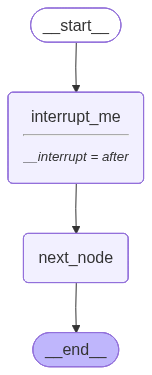
Next code invokes the graph.
state = graph.invoke(State(messages=["Initial message"]))
state
Interrupting node
{'messages': ['Initial message']}
The main feature is that the message from the interrupt_me node is printed, but the flow doesn’t proceed to the subsequent steps.
The following cell illustrates an alternative approach: it specifies the interrupt_before during the invocation of the graph.
graph = graph_builder.compile()
graph.invoke(
    State(messages=["Hello world"]),
    interrupt_before=["next_node"]
)
Interrupting node
{'messages': ['Hello world']}
Next node#
The checkpointer stores information about each thread. In particular, you can retrieve the information about a stopped graph from the state snapshot, which accessable via the graph’s get_state method of the graph. The next attribute contains the information about the next node to be executed.
The following cell invokes the graph which will be interrupted.
class State(TypedDict):
    pass


def node(state: State) -> State:
    interrupt("hello")
    return state


graph = (
    StateGraph(State)
    .add_node("node", node)
    .add_edge(START, "node")
    .add_edge("node", END)
    .compile(checkpointer=MemorySaver())
)

configuration = {"configurable": {"thread_id": "1"}}
graph.invoke(State(), configuration)
{'__interrupt__': [Interrupt(value='hello', id='a21abd2361562e72ae52dc3d4d8adcf6')]}
The next line retrieves the information about the node at which the execution will resume.
graph.get_state(configuration).next
('node',)
Continue execution#
The main purpose of the interrupt is langgraph is to build human in the loop applications: in which user can provide additional information to the LLM based application during the application execution.
To do that you have too:
Add memory to your graph.
The
interruptinvocation returns to the graph information provided from the flow outside the graph.To resume the execution, invoke graph again with
langgraph.types.Commandproviding additional information via theresumeargument.
The following cell defines the graph in which a single node calls interupt and publishes the result to the State.
class State(TypedDict):
    message_from_user: str | None


def node(state: State) -> State:
    ans = interrupt("Expecting input")
    return State(message_from_user=ans)


graph = (
    StateGraph(State)
    .add_node("a", node)
    .add_edge(START, "a")
    .add_edge("a", END)
    .compile(checkpointer=MemorySaver())
)
The config of the graph invocation is important here as it specifies which thread was interrupted.
config = {"configurable": {"thread_id": 1}}

ans = graph.invoke(
    State(message_from_user=None),
    config=config
)
ans
{'message_from_user': None,
 '__interrupt__': [Interrupt(value='Expecting input', id='100936f7c7bb3c64d03ee1b8833dc950')]}
The graph is interrupted. The next cell shows the how to resume the execution and provide the information to the graph.
graph.invoke(
    langgraph.types.Command(resume="This is input from user"),
    config=config
)
{'message_from_user': 'This is input from user'}
graph.invoke(
    State(message_from_user="Initial message"),
    config=config
)
graph.invoke(None, config=config)
{'message_from_user': 'Initial message',
 '__interrupt__': [Interrupt(value='Expecting input', id='de94044533a66c5a9b557e850e330069')]}