
Reducing#
Reducing is a principles that will be used to merge two different states, when both are supposed to be used in the following nodes.
from typing import TypedDict, Annotated
from langgraph.graph import START, END, StateGraph
Invalid Update#
If langgraph has two updates to the state and it cannot select one, it throws the InvalidUpdateError.
The following cell shows a regular graph with two flows join at the END node, and both their version of the state.
class State(TypedDict):
    out: str


def node_a(state: State) -> State:
    return State(out="A output")


def node_b(state: State) -> State:
    return State(out="B output")


builder = StateGraph(State)

builder.add_node("a", node_a)
builder.add_node("b", node_b)
builder.add_edge(START, "a")
builder.add_edge(START, "b")

graph = builder.compile()
graph
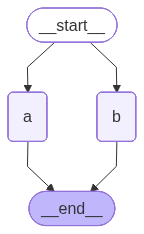
Executing such a graph results in the error displayed in the following cell.
try:
    graph.invoke(State(out="start"))
except Exception as e:
    print(type(e).__name__, ":", e)
InvalidUpdateError : At key 'out': Can receive only one value per step. Use an Annotated key to handle multiple values.
For troubleshooting, visit: https://docs.langchain.com/oss/python/langgraph/errors/INVALID_CONCURRENT_GRAPH_UPDATE
Sequential#
Note that if you’ve defined the reducer for the state attribute of the graph, the sequential state updates will also be merged.
Consider the following example: the attr1 does not have a reducer function, but to the attr2 does. Sequentially connected nodes simply return state updates with a list with a single random value.
import random
import operator


class State(TypedDict):
    attr1: list[int]
    attr2: Annotated[list[int], operator.add]


def gen_value():
    return random.randint(5, 10)


def node1(state: State) -> dict:
    return {"attr1": [gen_value()], "attr2": [gen_value()]}


def node2(state: State) -> State:
    return State(attr1=[gen_value()], attr2=[gen_value()])


graph = (
    StateGraph(State)
    .add_node("node1", node1)
    .add_node("node2", node2)

    .add_edge(START, "node1")
    .add_edge("node1", "node2")
    .add_edge("node2", END)
    .compile()
)
The following cell applies the graph.
graph.invoke(State(attr1=[1], attr2=[2]))
{'attr1': [9], 'attr2': [2, 5, 10]}
Despite the fact that there is no branching in the graph, the generated values are appended to attributes that have reducers, rather than replacing them. For attributes without reducers, InvalidUpdateError is not raised because there is no ambiguous update - the new value just replaces the previous value in the graph.
Messages#
In agent flow development, it is common practice to merge the messages from the different nodes. To add new messages to the list of messages, use langcahin.graph.message.add_messages as a reduce function.
The following cell generates the graph using the langgraph.graph.message.add_message as a reducer function. The only node that the graph uses simply adds an extra message to the messages list.
from langgraph.graph.message import add_messages
from langchain_core.messages import HumanMessage, BaseMessage


class State(TypedDict):
    messages: Annotated[list[BaseMessage], add_messages]


def a(state: State) -> State:
    return State(messages=[HumanMessage("Message from the a")])


graph = (
    StateGraph(State)
    .add_node("a", a)
    .add_edge("__start__", "a")
    .add_edge("a", "__end__")
    .compile()
)
The following cell shows how an additional message from node “a” is added to the input message.
graph.invoke(State(messages=[HumanMessage("Input message")]))["messages"]
[HumanMessage(content='Input message', additional_kwargs={}, response_metadata={}, id='05ce9be2-0154-4a98-a8f9-e2cc4e44c994'),
 HumanMessage(content='Message from the a', additional_kwargs={}, response_metadata={}, id='21d9b690-c35f-4d8f-a37e-fe7a6e11158b')]
Re-writing#
In BaseMessage you can specify the id of the message. The langgraph.graph.message.add_message reducer function replaces the message by a provided in a new state with a same id.
The following cell defines a graph a single node that returns a state with the attribute id=1. The graph invocation passes the different massage but with id=1 as well:
def a(state: State) -> State:
    return State(messages=[HumanMessage("Message from the a", id=1)])


out = (
    StateGraph(State)
    .add_node("a", a)
    .add_edge(START, "a")
    .add_edge("a", END)
    .compile()
).invoke(State(
    messages=[
        HumanMessage("Original message", id=1)
    ]
))

for m in out['messages']:
    m.pretty_print()
================================ Human Message =================================

Message from the a
As a result, the graph returns the message added to the node, ignoring the original message passed to it.
Remove#
By adding instances of langchain_core.messages.RemoveMessage with the corresponding ids, you can instruct the langchain_core.messages.add_messages to remove the messages with the specified ids.
The following cell applies the add_messages reducer on the lists of messages.
from langchain_core.messages import RemoveMessage


messages = [
    HumanMessage("Hello", id=1),
    HumanMessage("World", id=2)
]

update = [
    RemoveMessage(id=1),
    HumanMessage("New message", id=3)
]

add_messages(messages, update)
[HumanMessage(content='World', additional_kwargs={}, response_metadata={}, id='2'),
 HumanMessage(content='New message', additional_kwargs={}, response_metadata={}, id='3')]
As a result, the message with id=1, which is specified in the RemoveMessage, is excluded from the output.
Custom reducer#
You can define your own reducer function. This function must take two arguments - the values of the annotated with this attribute from different updates of the graph - and return a reduced value.
The following cell creates a using a custom reducer function that simply adds the values of the val attribute from the different states.
def my_reducer(val1: int, val2: int):
    return val1 + val2


class State(TypedDict):
    val: Annotated[int, my_reducer]


def node(state: State) -> dict:
    return {"val": 10}


(
    StateGraph(State)
    .add_node("node", node)
    .add_edge(START, "node")
    .add_edge("node", END)
    .compile()
).invoke({"val": 1})
{'val': 11}